
Self-host DeerFlow for deep research
ByteDance's research agent on its own VM, with keyless models and a private web UI.
Shelley handles the setup. About 15 minutes. Needs a 50 GB disk: Shelley sends you a link to grow it.
Prefer a terminal?
curl -fsSL https://exe-staging.dev/deploy/deer-flow/prompt.txt | ssh exe.dev new --disk=50GB --prompt=/dev/stdinDeerFlow is ByteDance's open-source "super agent harness": one lead agent that plans, searches the web, reads pages, writes files, and hands parts of a job to sub-agents, all from a chat window. Its best-known trick is deep research: ask a question, go do something else, and come back to a cited report as a Markdown file. With more than 85,000 stars on GitHub, it's among the most popular open-source research agents.
An exe.dev VM is a comfortable home for it. The web UI stays private
behind exe.dev's HTTPS proxy, so nobody reaches DeerFlow's
own sign-in page but you. Claude and GPT come through exe.dev's
LLM integration, so there are no API keys in
config.yaml. Web search and page fetching need no accounts either. And
the VM is always on: a half-hour research run keeps going after you
close the tab, and the reports stay on the VM's disk.
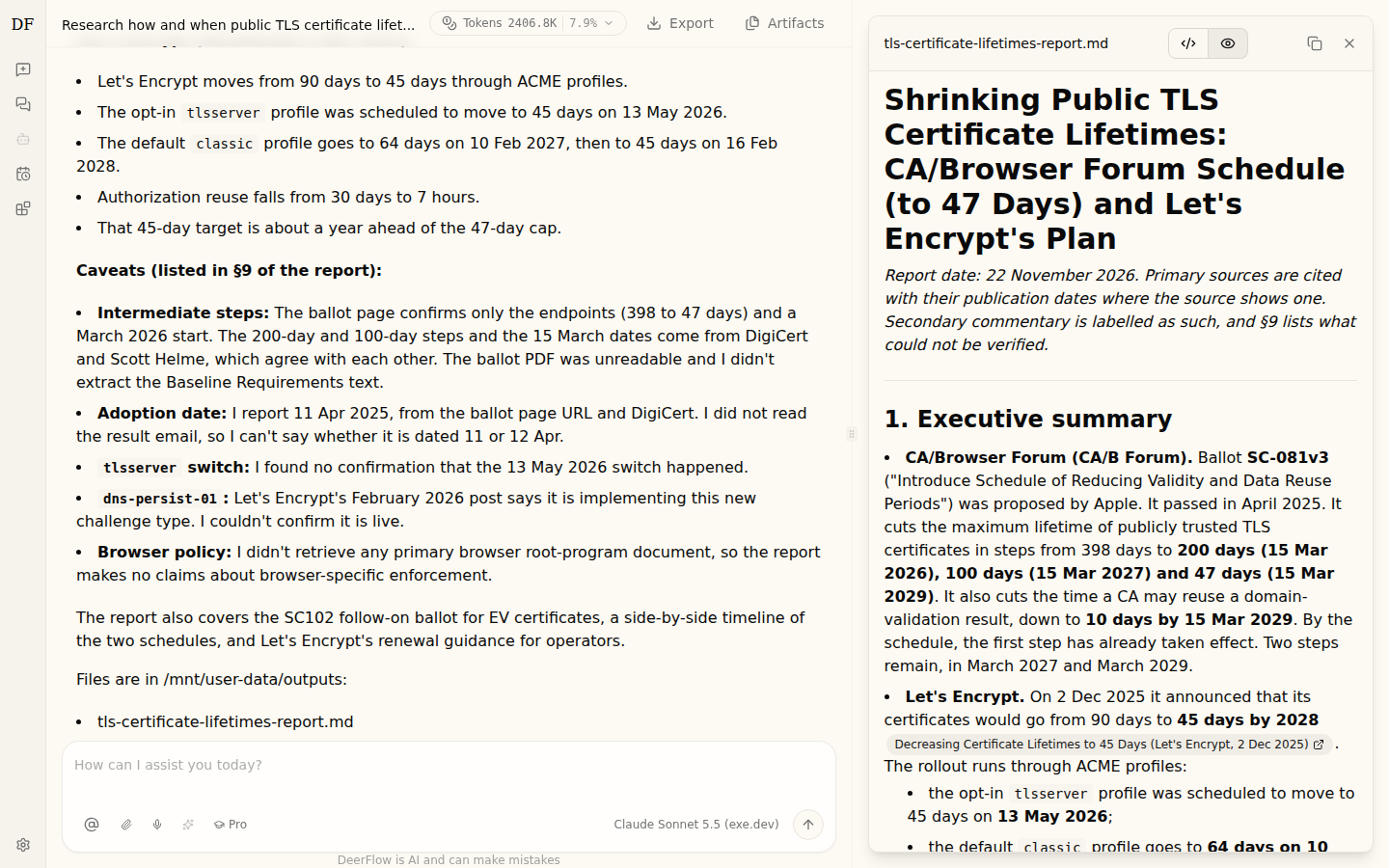
This recipe runs DeerFlow 2.2.0 from its own production Docker Compose setup. A research run on it looked like this:
What you get#
- DeerFlow 2.2.0 from its official Docker Compose deployment, restarted after a reboot.
- A private web UI at
https://<vm>.exe.xyz/, with you as the admin and sign-ups closed. - Claude Sonnet 5.5 and GPT-5.4 mini through exe.dev's LLM integration, with no API keys.
- Deep research with keyless web search and page fetching, ending in a Markdown report you can download.
- Nightly backups of chats, reports, settings and secrets in
~/backups/deer-flow.
What's running, and where
https://my-deer-flow.exe.xyz/
The DeerFlow web UI, behind your exe.dev login and a DeerFlow account
https://my-deer-flow.exe.xyz/api/langgraph/
The run API, for scripts and other VMs with a VM token and a DeerFlow access token
make up): Next.js web UI, Python gateway with the agent runtime, Redis and nginx, built on the VM
Deploy with Shelley#
Click Deploy and Shelley will set up DeerFlow on a new VM, then check that it works. No config-file wrangling required.
DeerFlow needs a 50 GB disk, more than a new VM has. Shelley checks first and, if it's too small, gives you a link to grow it; the terminal command below makes the VM that size from the start.
Prefer a terminal?
curl -fsSL \
  https://exe-staging.dev/deploy/deer-flow/prompt.txt \
  | ssh exe.dev new --disk=50GB --prompt=/dev/stdin
What Shelley is told
Set up DeerFlow on this VM by following the exe.dev recipe at https://exe-staging.dev/deploy/deer-flow.md?via=deploy from top to bottom.

The recipe's example VM name is my-deer-flow. This VM's name is the output of `hostname`: use it wherever the recipe writes my-deer-flow. Skip the step that creates the VM; you are on it.

This recipe needs a 50GB disk, and a new VM's may be smaller. Before you install anything, run `df -h /`. If its size is under 45G, stop and ask me to grow the disk, either with this link: https://exe.dev/suggest?command=resize%20my-deer-flow%20--disk%3D50GB or, on my computer, with `ssh exe.dev resize my-deer-flow --disk=50GB`. When I say it's done, run `sudo resize2fs "$(findmnt -no SOURCE /)"`, check `df -h /` again, and carry on.

You are done when all of these are true. Check each one yourself:
- DeerFlow 2.2.0 from its official Docker Compose deployment, restarted after a reboot.
- A private web UI at `https://<vm>.exe.xyz/`, with you as the admin and sign-ups closed.
- Claude Sonnet 5.5 and GPT-5.4 mini through exe.dev's LLM integration, with no API keys.
- Deep research with keyless web search and page fetching, ending in a Markdown report you can download.
- Nightly backups of chats, reports, settings and secrets in `~/backups/deer-flow`.

Read the whole recipe, including the closed details. For initial setup,
follow "Install by hand" first, skipping VM creation and SSH but not the
disk check, through "Set up nightly backups". The walkthrough at the top
is for the owner afterwards. The build takes about five minutes on 4
CPUs and longer on 2; that is normal. Never print ~/deer-flow-admin.txt,
.env or the files under backend/.deer-flow into the chat; tell the owner
where the password is. Don't make the VM public, don't switch on the
Docker sandbox, and don't create access tokens unless the owner asks.
Finish by giving the owner the URL and where the password is.

Finish with the URLs I should open.
Also at /deploy/deer-flow/prompt.txt. The recipe it follows is /deploy/deer-flow.md.
Run a deep research#
Open https://my-deer-flow.exe.xyz/ and sign in to exe.dev, then click
Get Started with 2.0 and sign in to DeerFlow with your exe.dev email and the
password in ~/deer-flow-admin.txt on the VM (Shelley tells you where it
is). Change it under Settings → Account.
In a new chat, pick Pro in the mode menu below the message box (Pro plans before it acts; Ultra also sends sub-agents off in parallel), then ask something with a real answer, like:
Research how and when public TLS certificate lifetimes are being shortened (the CA/Browser Forum schedule down to 47 days, and what Let's Encrypt is doing). Cite primary sources with dates, and save the report as a Markdown file.
DeerFlow loads its deep-research skill, writes a to-do list, and starts
searching and reading; expand the steps to watch. The run above took 27
minutes, made 79 model calls, read about 40 pages, and wrote a 185-line
report with dated sources and an honest list of what it couldn't
verify. When it's done the report opens beside
the chat; download it from there, or Export the whole conversation.
Reports are plain files on the VM, under
~/deer-flow/backend/.deer-flow/users/<user>/threads/<chat>/user-data/outputs/,
and they're in the nightly backup.
Note
Deep research spends tokens freely: each of those 79 calls sent the model 15,000 to 35,000 tokens of context, 2.4 million tokens in all. The same question with GPT-5.4 mini took 41 seconds and 160,000 tokens for a shorter, shallower report. Use it or Flash mode for quick questions, and keep an eye on your LLM usage and the model prices.
Choose models#
The two models in config.yaml come through exe.dev with no keys:
| Model | Use it for |
|---|---|
| Claude Sonnet 5.5 (exe.dev) | research, long reports, planning; the default |
| GPT-5.4 mini (exe.dev) | quick questions and cheaper runs |
Pick one per chat in the menu at the bottom right of the message box. To
add another model from exe.dev's model list, copy
one of the entries under models: in ~/deer-flow/config.yaml, change
name, display_name and model, and restart the gateway:
docker restart deer-flow-gateway
Admins can also add models in the browser, under Settings → Models,
including other providers with their own API keys; DeerFlow stores those
keys encrypted under backend/.deer-flow. Entries from config.yaml
show there read-only.
Note
Keep the
reasoning:block on each model. Without it DeerFlow treats the model as unable to think and offers only Flash mode.
Search the web without accounts#
Research runs use two keyless tools:
- Web search goes through DuckDuckGo (with its
ddgslibrary, which also falls back to other engines). It's free and it works, but it's rate-limited and busy IPs get turned away: in testing some backends answered429or403mid-run and DeerFlow carried on with the rest. - Page fetching uses the Jina reader,
which turns a URL into Markdown. Without an API key it's free and
rate-limited; if you have a key, add
JINA_API_KEY=<key>to~/deer-flow/.envand rundocker restart deer-flow-gateway.
For searches nobody rate-limits, run your own
SearXNG and point DeerFlow at it. In config.yaml,
replace the use: line of the web_search tool:
  - name: web_search
    group: web
    use: deerflow.community.searxng.tools:web_search_tool
    base_url: https://searxng.int.exe.xyz
    max_results: 5
Here searxng.int.exe.xyz is a
VM-to-VM integration from this VM to your
SearXNG VM, so neither VM holds a token. Create it on your computer:
ssh exe.dev integrations add http-proxy --name searxng \
  --target https://my-searxng.exe.xyz/ --peer --attach vm:my-deer-flow
The SearXNG recipe already turns on the JSON API DeerFlow uses. Restart the gateway after the change.
DeerFlow also has fetch backends for Firecrawl,
Crawl4AI and Browserless, for pages that need a real browser (only one
web_fetch can be active). These servers fetch whatever URL the agent
asks for, so DeerFlow won't use a self-hosted one until you set
allow_private_addresses and network_isolation_confirmed to say its
network can't reach anything private. A Firecrawl on a VM of its own,
with no integrations attached, comes close; read the comments above each
web_fetch entry in config.yaml first.
Let it run code#
Out of the box DeerFlow's sandbox is the gateway container itself, with
host bash switched off (allow_host_bash: false): the agent can read and
write files in each chat's workspace, but can't run commands. Skills that
run scripts, such as charts, data analysis or slide decks, stop short
there.
The fix upstream offers is the AIO sandbox: each chat gets its own container with Python, Node.js, a shell and a browser. It takes 13 GB more disk for the image, and in effect root on the VM (see the warning below). To turn it on, on the VM:
cd ~/deer-flow
sed -i 's|^  use: deerflow.sandbox.local:LocalSandboxProvider$|  use: deerflow.community.aio_sandbox:AioSandboxProvider\n  image: enterprise-public-cn-beijing.cr.volces.com/vefaas-public/all-in-one-sandbox:1.11.0\n  replicas: 2\n  network:\n    mode: allowlist\n    allow_domains: [pypi.org, files.pythonhosted.org]\n    approval: deny|' config.yaml
sed -n '/^sandbox:/,+7p' config.yaml
docker pull -q enterprise-public-cn-beijing.cr.volces.com/vefaas-public/all-in-one-sandbox:1.11.0
make up
make up sees the new provider and mounts the Docker socket into the
gateway. The first command in a chat then starts a sandbox container
(a few seconds), and up to two stay warm. In testing, the agent ran
Python 3.10, installed a package from PyPI, and was refused everything
else.
The network: block matters on exe.dev. Without it (mode: open),
code in the sandbox can reach anything the VM can, including
https://*.int.exe.xyz: your LLM integration and any other
integrations attached to the VM, with exe.dev
adding the credentials. A plain container on the VM fetched
llm.int.exe.xyz/v1/models without trouble. allowlist sends the
sandbox's traffic through a filtering proxy that refuses private and
link-local addresses outright, and other hosts unless listed; add
registry.npmjs.org or github.com to allow_domains if your skills
need them. Keep approval: deny: with prompt, the image's built-in
browser trips the policy on start-up (it calls www.gstatic.com) and
every command fails with a blocked-domain card.
Warning
Give DeerFlow a VM of its own. With the AIO sandbox,
make upmounts the Docker socket into the gateway, and the Docker socket is root on the VM. Anyone who can sign in to DeerFlow as an admin can also install MCP servers that run commands. Treat access to DeerFlow like a root shell: keep the VM private, keep sign-ups closed, and keep no other services or secrets on it.
Skills, MCP and sub-agents#
DeerFlow 2.2.0 ships 23 skills (deep research, academic paper review,
data analysis, slide decks, podcasts, newsletters and more), each a
folder with a SKILL.md, in the same format Claude Code uses. Browse
and switch them in the Capability Center. Skills you install or that
the agent writes for you go into your own folder under
backend/.deer-flow/users/, which the backup covers.
MCP servers go in ~/deer-flow/extensions_config.json, or in the
Capability Center for admins. Remote servers over HTTP need nothing
else; local ones run with npx or uvx inside the gateway container.
exe.dev integrations work too: an MCP server that
calls https://<name>.int.exe.xyz gets credentials added at the edge,
with nothing stored in DeerFlow.
Ultra mode, or asking for it, lets the lead agent hand pieces of a job to sub-agents that run in parallel, each with its own context. That's faster for broad questions and multiplies the tokens.
Call it from scripts and other VMs#
DeerFlow's run API is under /api/langgraph/, LangGraph-compatible, on
the same URL as the web UI. Two locks guard it: exe.dev's proxy wants a
token for the VM, and DeerFlow wants an
access token of its own.
First, a DeerFlow access token. DeerFlow 2.2.0 has no page for them yet, so create one through its API, on the VM, while signed in as you. This one can read and start chats and runs for 90 days, and lands in a file only you can read:
J=$(mktemp)
. ~/deer-flow-admin.txt
curl -fsS -c "$J" http://localhost:8000/api/v1/auth/login/local \
  --data-urlencode "username=$email" --data-urlencode "password=$password" >/dev/null
unset password
CSRF=$(awk '$6 == "csrf_token" {print $7}' "$J")
(umask 077; curl -fsS -b "$J" -H "X-CSRF-Token: $CSRF" -H 'Content-Type: application/json' \
  http://localhost:8000/api/v1/auth/pats \
  -d '{"name": "scripts", "scopes": ["threads:read", "threads:write", "runs:create", "runs:read"], "expires_in_days": 90}' \
  | jq -r .token > ~/deer-flow-api-token)
rm -f "$J"
Access tokens reach only chats and runs, never settings, and never carry admin rights. Then, on your computer, a token for the VM and a copy of the access token:
(umask 077; ssh exe.dev ssh-key generate-api-key --vm=my-deer-flow --label=deer-flow > ~/.deer-flow-vm-token)
(umask 077; ssh my-deer-flow.exe.xyz cat deer-flow-api-token > ~/.deer-flow-api-token)
Send the VM token as X-Exedev-Authorization, which exe.dev's proxy
checks and removes, and the access token as Authorization, which
reaches DeerFlow:
U=https://my-deer-flow.exe.xyz/api/langgraph
H=(-H "X-Exedev-Authorization: Bearer $(cat ~/.deer-flow-vm-token)"
   -H "Authorization: Bearer $(cat ~/.deer-flow-api-token)"
   -H 'Content-Type: application/json')
T=$(curl -fsS "${H[@]}" $U/threads -d '{}' | jq -r .thread_id)
curl -fsS "${H[@]}" $U/threads/$T/runs/wait -d '{
  "assistant_id": "lead_agent",
  "input": {"messages": [{"role": "user", "content": "What is the capital of Portugal? One word."}]},
  "config": {"configurable": {"model_name": "gpt-5-4-mini"}}
}' | jq -r '.messages[-1].content'
It answers Lisbon. For a research run that takes minutes, start it in
the background with POST $U/threads/$T/runs (same body), poll
GET $U/threads/$T/runs/<run_id> until status is success, then read
the answer from GET $U/threads/$T/state. For such runs, put
"recursion_limit": 1000 in config, as the web UI does: the API's
default of 100 steps stops a research run partway with status: error.
Add "thinking_enabled": true, "is_plan_mode": true to configurable
for what the web UI calls Pro, and "subagent_enabled": true as well
for Ultra.
The LangGraph SDK
works too, pointed at the same URL.
For a script or agent on another exe.dev VM, keep both tokens off that
VM with a VM-to-VM integration: exe.dev
adds the VM's key at the edge, and --bearer adds the access token. On
your computer (my-agent-vm is the VM that calls DeerFlow):
ssh exe.dev integrations add http-proxy --name deer-flow \
  --target https://my-deer-flow.exe.xyz/ --peer \
  --bearer "$(cat ~/.deer-flow-api-token)" --attach vm:my-agent-vm
On my-agent-vm, use https://deer-flow.int.exe.xyz/api/langgraph with
no tokens at all.
Warning
An access token starts runs as you, on your models. Revoke one with
DELETE /api/v1/auth/pats/<id>(list them withGET /api/v1/auth/pats, signed in as above), and VM tokens withssh exe.dev ssh-key remove.
Size and limits#
Measured on a VM with 4 CPUs, 8 GB of memory and 50 GB of disk:
| Measure | Result |
|---|---|
First make up (build and start) |
about 4 minutes, memory peaking near 5.5 GB |
| Memory while idle or researching | about 1.1 GB for the whole stack |
| Disk for images and build cache | about 18 GB (7.8 GB of it cache that docker builder prune frees) |
| One Pro-mode research report (Claude Sonnet 5.5) | 27 minutes, 79 model calls, 2.4 million tokens, 185 lines |
| The same question with GPT-5.4 mini | 41 seconds, 11 model calls, 160,000 tokens, 49 lines |
| With the AIO sandbox | 13 GB more disk; about 2.4 GB of memory with two sandboxes warm |
The stack itself is light; the build is not. On a default VM (2 CPUs,
8 GB, 25 GB disk) the build would leave about 2 GB of disk free, and
nothing for the sandbox or updates, so make the VM with
--cpu=4 --disk=50GB (within your plan's limits). The thinking happens
at the model provider, so DeerFlow needs no GPU, and one person's
research runs barely used the 4 CPUs. Upstream suggests 8 CPUs and
16 GB for a long-running server with many users.
Other limits worth knowing:
- Chat channels weren't tested. DeerFlow can also answer in Slack, Telegram, Feishu and others. They connect out from the VM, so they shouldn't need an open port, but this recipe hasn't tried them.
- The web UI has its own accounts. DeerFlow doesn't read exe.dev's login headers, so you sign in twice: once to exe.dev, once to DeerFlow.
- Sign-ups are closed. To add a person, share the VM with them
(
ssh exe.dev share add my-deer-flow their@email), setallow_registration: trueunderauth.localinconfig.yamluntil they've used the Sign up link on DeerFlow's sign-in page, then set it back tofalse. DeerFlow picks the change up within seconds, no restart needed.
Setup and upkeep#
No need to read on unless you're curious, or doing it yourself.
Install by hand
Create a VM#
On your computer (pick another name if my-deer-flow is taken):
ssh exe.dev new --name=my-deer-flow --cpu=4 --disk=50GB
ssh my-deer-flow.exe.xyz
All remaining installation commands run on the VM, as exedev.
They use hostname, so your VM can have any name.
Room on the disk#
DeerFlow builds its images on the VM, and images plus build cache take about 18 GB. Check the disk:
df -h /
nproc
If Size is under 45G, the VM was made with a smaller disk. Grow it
with this link
(with your VM's name), or on your computer with
ssh exe.dev resize my-deer-flow --disk=50GB. Then, back on the VM, grow
the filesystem to match:
sudo resize2fs "$(findmnt -no SOURCE /)"
df -h /
nproc under 4 is fine; the build just takes longer.
Get Docker ready#
Enable Docker at boot, or exe.dev's on-demand Docker won't start DeerFlow after a reboot. DeerFlow needs Docker Compose 2.24 or newer:
sudo systemctl enable --now docker.service
systemctl is-enabled docker.service
docker compose version
Expect enabled and a version of 2.24 or later.
Download DeerFlow#
Clone the 2.2.0 release and start from its example settings:
git clone -q -c advice.detachedHead=false --depth 1 --branch v2.2.0 \
  https://github.com/bytedance/deer-flow.git ~/deer-flow
cd ~/deer-flow
git describe --tags
cp config.example.yaml config.yaml
It prints v2.2.0.
Connect the models#
The example settings come with no models. Add two from exe.dev's LLM
integration under models:. The api_key is a placeholder; exe.dev adds
the real credentials at the network edge:
cd ~/deer-flow
sed -i '/^models:$/r /dev/stdin' config.yaml <<'YAML'
  - name: claude-sonnet-5-5
    display_name: Claude Sonnet 5.5 (exe.dev)
    use: langchain_anthropic:ChatAnthropic
    model: claude-sonnet-5-5
    base_url: https://llm.int.exe.xyz
    api_key: exe-gateway
    default_request_timeout: 600.0
    max_retries: 2
    max_tokens: 16000
    context_window: 200000
    supports_vision: true
    reasoning:
      thinking: required
      on_disable_request: keep_enabled
      dialect: none
  - name: gpt-5-4-mini
    display_name: GPT-5.4 mini (exe.dev)
    use: langchain_openai:ChatOpenAI
    model: gpt-5.4-mini
    base_url: https://llm.int.exe.xyz/v1
    api_key: exe-gateway
    max_tokens: 16000
    supports_vision: true
    reasoning:
      thinking: required
      on_disable_request: keep_enabled
      dialect: none
YAML
grep -c 'llm.int.exe.xyz' config.yaml
It prints 2. The first model listed is the default.
Close sign-ups and pick the port#
DeerFlow lets anyone with the URL create an account unless told otherwise. Close that, and have nginx listen on port 8000, the VM's main HTTPS port (still bound to 127.0.0.1, so only exe.dev's proxy reaches it):
cd ~/deer-flow
cat >> config.yaml <<'YAML'

# exe.dev: accounts are created by the admin, not by visitors
auth:
  local:
    allow_registration: false
YAML
(umask 077; printf 'PORT=8000\n' > .env)
Build and start#
make up is DeerFlow's production deployment: it builds the web UI and
gateway images, generates the secrets DeerFlow needs, and starts nginx,
the web UI, the gateway and Redis with restart: unless-stopped. It takes
about four minutes on 4 CPUs:
cd ~/deer-flow
make up
docker ps --format '{{.Names}}: {{.Status}}'
It ends with DeerFlow is running!, and lists deer-flow-nginx,
deer-flow-frontend, deer-flow-gateway (healthy) and deer-flow-redis
(healthy).
Create your admin account#
The first account becomes the admin. Create it now, before anyone else can, with your exe.dev email (from the reflection integration) and a generated password kept in a file only you can read:
EMAIL=$(curl -fsS https://reflection.int.exe.xyz/email | jq -r .email)
PASSWORD=$(openssl rand -hex 12)
(umask 077; printf 'email=%s\npassword=%s\n' "$EMAIL" "$PASSWORD" > ~/deer-flow-admin.txt)
curl -fsS http://localhost:8000/api/v1/auth/initialize \
  -H 'Content-Type: application/json' \
  -d "{\"email\":\"$EMAIL\",\"password\":\"$PASSWORD\"}" | jq '{email, system_role}'
unset PASSWORD
It prints your email and "system_role": "admin". If EMAIL comes back
empty, set it to your exe.dev email by hand.
Check sign-in and a model#
Sign in through the API and ask GPT-5.4 mini a question, the same way the web UI does:
J=$(mktemp)
. ~/deer-flow-admin.txt
curl -fsS -c "$J" http://localhost:8000/api/v1/auth/login/local \
  --data-urlencode "username=$email" --data-urlencode "password=$password" >/dev/null
unset password
CSRF=$(awk '$6 == "csrf_token" {print $7}' "$J")
T=$(curl -fsS -b "$J" -H "X-CSRF-Token: $CSRF" -H 'Content-Type: application/json' \
  http://localhost:8000/api/langgraph/threads -d '{}' | jq -r .thread_id)
curl -fsS -b "$J" -H "X-CSRF-Token: $CSRF" -H 'Content-Type: application/json' \
  "http://localhost:8000/api/langgraph/threads/$T/runs/wait" -d '{
    "assistant_id": "lead_agent",
    "input": {"messages": [{"role": "user", "content": "In one sentence: what is DeerFlow?"}]},
    "config": {"configurable": {"model_name": "gpt-5-4-mini"}}
  }' | jq -r '.messages[-1].content'
rm -f "$J"
A sentence about DeerFlow comes back within seconds, and the chat shows
up in the web UI later. A 401 means the email or password didn't
match; a model error points at the models: entries.
Set up nightly backups#
A small script copies the database (with SQLite's online backup), the
settings, the generated secrets and every user's files into
~/backups/deer-flow each night, keeping the newest 14:
sudo tee /usr/local/bin/deer-flow-backup >/dev/null <<'EOF'
#!/bin/sh
# Nightly DeerFlow backup: settings, secrets, database, user files.
set -eu
APP=/home/exedev/deer-flow
DEST=/home/exedev/backups/deer-flow
STAMP=$(date +%Y%m%d-%H%M%S)
TMP=$(mktemp -d)
trap 'rm -rf "$TMP"' EXIT
install -d -o exedev -g exedev /home/exedev/backups
install -d -o exedev -g exedev -m 700 "$DEST"
sqlite3 "$APP/backend/.deer-flow/data/deerflow.db" ".backup '$TMP/deerflow.db'"
tar -czf "$DEST/deer-flow-$STAMP.tar.gz" \
  -C "$APP" --exclude=backend/.deer-flow/data \
  config.yaml .env extensions_config.json backend/.deer-flow \
  -C "$TMP" deerflow.db
chown exedev:exedev "$DEST/deer-flow-$STAMP.tar.gz"
chmod 600 "$DEST/deer-flow-$STAMP.tar.gz"
ls -1t "$DEST"/deer-flow-*.tar.gz | tail -n +15 | xargs -r rm --
EOF
sudo chmod 755 /usr/local/bin/deer-flow-backup
sudo tee /etc/systemd/system/deer-flow-backup.service >/dev/null <<'EOF'
[Unit]
Description=Back up DeerFlow

[Service]
Type=oneshot
ExecStart=/usr/local/bin/deer-flow-backup
EOF
sudo tee /etc/systemd/system/deer-flow-backup.timer >/dev/null <<'EOF'
[Unit]
Description=Back up DeerFlow nightly

[Timer]
OnCalendar=*-*-* 03:30
Persistent=true

[Install]
WantedBy=timers.target
EOF
sudo systemctl daemon-reload
sudo systemctl enable --now deer-flow-backup.timer
sudo systemctl start deer-flow-backup.service
ls -l ~/backups/deer-flow
systemctl list-timers deer-flow-backup.timer --no-pager
One deer-flow-<date>.tar.gz appears, and the timer lists its next run.
Open it#
Open https://$(hostname).exe.xyz/, sign in to exe.dev if asked, click
Get Started with 2.0, and sign in with the email and password from
~/deer-flow-admin.txt.
Back up and restore
Each night at 03:30 UTC, deer-flow-backup.timer writes
~/backups/deer-flow/deer-flow-<date>.tar.gz with:
config.yaml,.envandextensions_config.json;backend/.deer-flow: the generated secrets (.better-auth-secret,.credentials_key,.internal-auth-token,.jwt_secret), memory, custom skills and agents, and every chat's uploads and reports;deerflow.db, a consistent copy of the database (accounts, chats, access tokens) taken with SQLite's online backup.
Run one now with sudo systemctl start deer-flow-backup.service. The
archives hold secrets and conversations, so they're readable only by
you; copy them off the VM too. On your computer:
rsync -av my-deer-flow.exe.xyz:backups/deer-flow/ ./deer-flow-backups/
For the whole disk, exe.dev's VM backups (in preview) copy it to your own S3 bucket.
To restore on this VM or a new one with DeerFlow installed (through
Download DeerFlow; skip the rest), copy the archive to
~/backups/deer-flow/ and, on the VM:
cd ~/deer-flow
make down
B=$(ls -1t ~/backups/deer-flow/deer-flow-*.tar.gz | head -1)
sudo tar -xzf "$B" -C ~/deer-flow
sudo mkdir -p backend/.deer-flow/data
sudo mv ~/deer-flow/deerflow.db backend/.deer-flow/data/deerflow.db
sudo rm -f backend/.deer-flow/data/deerflow.db-wal backend/.deer-flow/data/deerflow.db-shm
make up
Sign in with the old password; chats, reports and access tokens are back.
Update
DeerFlow releases every few weeks; read the
changelog
first, since 2.x still changes settings between releases. Take a backup,
check out the new tag, merge new settings into your config.yaml (it
saves the old one as config.yaml.bak), and rebuild. On the VM, with the
release you want in V:
sudo systemctl start deer-flow-backup.service
cd ~/deer-flow
V=2.2.0
git fetch -q --depth 1 origin tag v$V && git checkout -q v$V
make config-upgrade
make up
docker image prune -f && docker builder prune -f
config.yaml, .env, extensions_config.json and backend/.deer-flow
aren't part of the checkout, so they stay. To go back, restore the
backup taken before the update.
Something stuck?
-
Containers:
cd ~/deer-flow && docker ps -aanddocker logs --tail 100 deer-flow-gateway(ordeer-flow-frontend,deer-flow-nginx).make prod-logsfollows them all. -
make upfails withno space left on device: the disk is too small. See Room on the disk, thendocker builder prune -fandmake upagain. -
502 from nginx right after
make upor a reboot: the gateway takes half a minute to become healthy. Wait, then reload. -
Only Flash mode in the menu: the model in
config.yamllost itsreasoning:block. -
A model answers
401or404: checkbase_url: Anthropic models usehttps://llm.int.exe.xyz, OpenAI modelshttps://llm.int.exe.xyz/v1.curl -s https://llm.int.exe.xyz/v1/modelson the VM should list models. -
Searches come back empty or with
429: DuckDuckGo and its fallbacks are rate-limiting the VM. Wait, or switch to your own SearXNG. -
Forgot the password:
~/deer-flow-admin.txthas the first one. Otherwise reset it on the VM:docker exec -w /app/backend deer-flow-gateway uv run --no-sync python -m app.gateway.auth.reset_admin sudo cat ~/deer-flow/backend/.deer-flow/admin_initial_credentials.txtSign in with the new password and DeerFlow asks you to set your own; then
sudo rmthe file. -
Locked out of
/setupor/loginwith a redirect loop on127.0.0.1: uselocalhostin URLs on the VM; nginx redirects127.0.0.1tolocalhost.
Frequently asked questions#
Is DeerFlow free? What does this cost?
DeerFlow is open source under the MIT license, with no paid tier. You pay for the VM as part of your exe.dev plan, and model calls go through exe.dev's LLM integration, billed to your exe.dev account. Deep research is token-hungry: one Pro-mode report here used 2.4 million tokens with Claude Sonnet 5.5.
Do I need an OpenAI or Anthropic API key?
No. The models in config.yaml point at https://llm.int.exe.xyz, and exe.dev adds the credentials at the network edge. The api_key field holds a placeholder only because the client libraries want a value. You can add other providers with their own keys in Settings → Models or in config.yaml.
Who can reach my DeerFlow?
Only you, until you share the VM: exe.dev's HTTPS proxy asks for your exe.dev login before any request reaches nginx, and DeerFlow then asks for its own account. Sign-ups are closed; to add someone you share the VM with, open them briefly while they sign up (see Size and limits). Scripts and other VMs get in with a VM token plus a DeerFlow access token.
Can DeerFlow run code? Is that safe?
Out of the box it reads and writes files in each chat's workspace but has no shell. The optional Docker sandbox lets it run Python and bash in containers, which needs the Docker socket mounted into the gateway, and that is root on the VM. Keep DeerFlow on a VM of its own with no secrets you wouldn't hand to the agent, and see Let it run code.
How big a VM does DeerFlow need?
Make it with 4 CPUs, 8 GB of memory and 50 GB of disk. The first build peaked near 5.5 GB of memory and took about four minutes on 4 CPUs; once running, the stack used about 1.1 GB. Images and build cache take about 18 GB of disk, more than a default 25 GB disk leaves room for.
Is this DeerFlow 1.x?
No. DeerFlow 2 is a ground-up rewrite: a general "super agent harness" with skills, sub-agents, memory, sandboxes and MCP, of which deep research is one skill. The old research-only 1.x lives on the main-1.x branch and isn't covered here.
Published Nov 22, 2026 · Updated Nov 22, 2026 · tested end to end Nov 22, 2026 · Markdown · manifest.json · Something wrong? Tell us